Support tickets get resolved faster with a five-minute recording than a 500-word reply. The question in 2026 is which screen recorder to actually use when a customer is waiting.
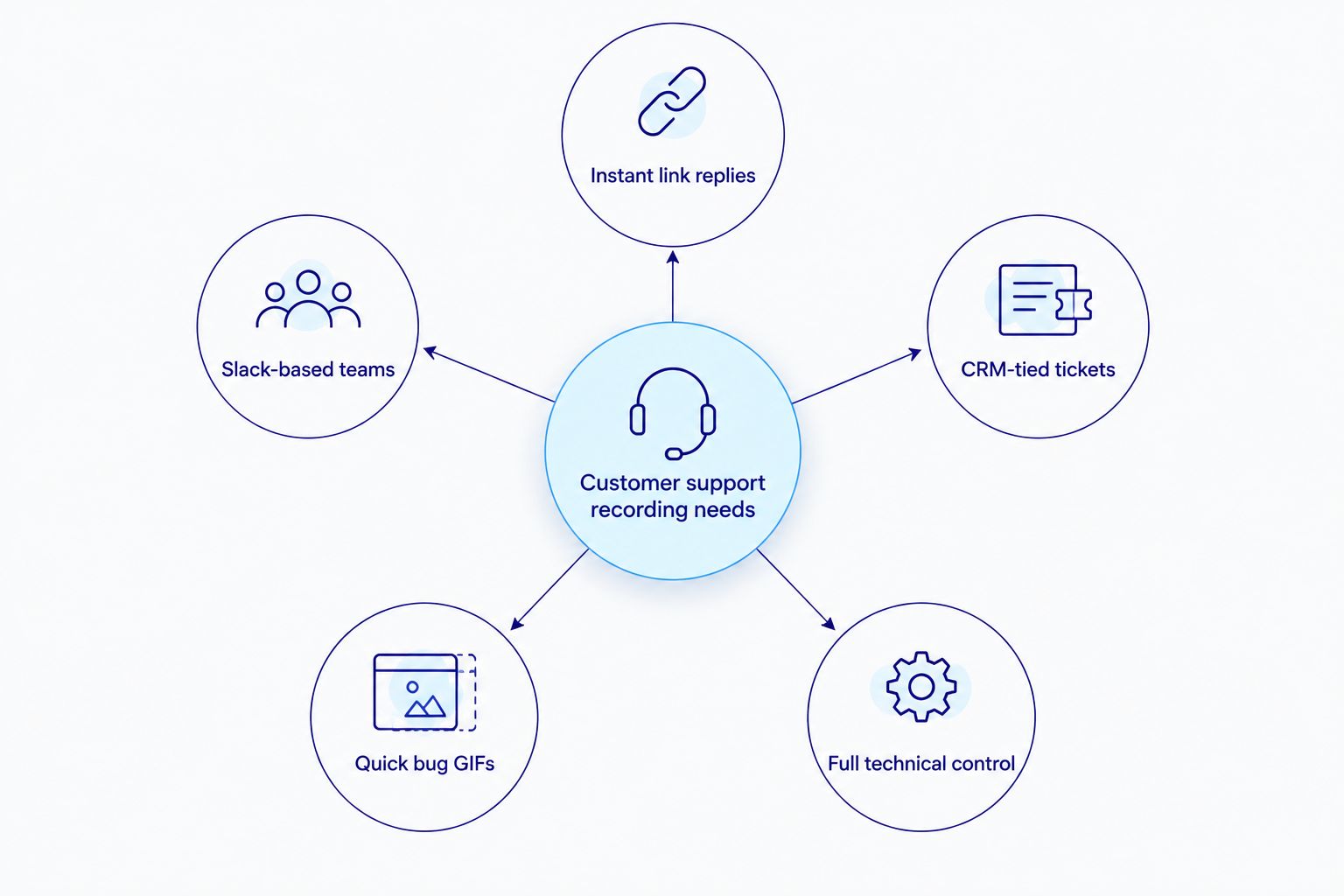
Best overall: Rekkko. Best for teams standardized on Slack and Google Workspace: Loom. Best free, open-source pick for technical agents: OBS Studio. Best for tickets tied to a CRM or sales handoff: Vidyard. Best for quick GIF bug reports: Zight.
- Rekkko is the best screen recording software for customer support in 2026 because there's no install and no viewer account.
- Loom fits teams already built around Slack and Google Workspace but often asks viewers to sign in.
- OBS Studio is the free, open-source pick for technical agents who want full recording control.
- Vidyard suits support tickets that flow into a CRM or sales pipeline.
- Zight handles fast GIF bug reports between support and engineering.
Why this matters
A support agent who has to explain a multi-step fix in text writes three paragraphs and still gets a follow-up question. A 90-second recording shows the click path once and the ticket closes. Rekkko is built for exactly that reply: open the browser, record the screen, send the link.
The friction that kills adoption isn't recording — it's the viewer's side. A customer who hits a login wall before watching a fix video drops the ticket, or worse, replies asking for a plain-text version. In 2026, the tools that win for support are the ones that remove that wall entirely.
What makes the best screen recording software for customer support
- No viewer account required to open the link
- Browser-based capture — no install, no IT approval needed
- Screen, voice, and camera captured together
- AI cleanup that trims filler words and dead air without a manual edit pass
- Fast enough to record and attach inside a single ticket reply
- Works the same whether the customer is on desktop or mobile
Screen recorders for customer support at a glance
| Tool | Best for | Standout feature | Key limitation |
|---|---|---|---|
| Rekkko | Instant link replies inside tickets | No install, no viewer account, AI transcript/filler trimming | No long-form editing timeline beyond trim and filler removal |
| Loom | Teams built around Slack/Google Workspace | Deep app integrations | Viewers are often prompted to sign in for full interaction |
| Vidyard | Tickets tied to a CRM or sales handoff | Viewer engagement tracking tied to sales tools | Heavier setup than a straight screen recorder |
| Zight | Quick GIF bug reports | Fast capture-to-share loop | Narration and camera capture are thinner |
| OBS Studio | Technical agents needing full control | Free, unlimited scenes and sources | No built-in link page — you host and send the file yourself |
1. Rekkko: best screen recording software for customer support tickets that need instant sharing
Rekkko records screen, voice, and camera in the browser, then generates a single link. The recipient opens it in any browser — no Rekkko account, no plugin. AI editing trims filler words and tightens the transcript automatically, so a rambling first take turns into a clean reply without a manual cut pass. It's the same approach covered in Rekkko's guide to AI video editors for screen recordings — the editing happens after you stop recording, not during.
Rekkko pros:
- Records and shares from the browser, no install
- Recipients open the link without creating an account
- AI editing trims filler words and dead air automatically
Rekkko cons:
- No long-form editing timeline for polished marketing cuts
- No dedicated CRM ticketing integration in the product today
Rekkko pricing: free, browser-based, no install required.
Best for: support agents who need a link a customer can open the moment the ticket comes in.
Verdict: Buy.
2. Loom: best screen recorder for teams standardized on Slack and Google Workspace
Loom records screen and camera and embeds cleanly into Slack, Notion, and Google Workspace threads. It's the most widely adopted async video tool going into 2026, and support teams already living in those apps get recordings without leaving the thread.
Loom pros:
- Mature integrations across Slack, Notion, and Google Workspace
- Familiar to most customers and teammates already
- Quick capture via browser extension or desktop app
Loom cons:
- Full viewer interaction (comments, reactions) often prompts a sign-in
- Best capture quality typically comes from the desktop app, adding an install step
Best for: teams whose support workflow already runs through Slack or Google Workspace.
Verdict: Hold — fine if you're already embedded, not worth switching for on its own.
3. Vidyard: best for support tickets tied to a CRM or sales handoff
Vidyard hosts video with viewer engagement tracking built for teams that pass recordings between sales, support, and account management. When a support ticket escalates into a renewal conversation, that tracking has real value.
Vidyard pros:
- Viewer engagement data tied to CRM and sales tools
- Built for handoffs between support and sales teams
- Video hosting library beyond single-link sharing
Vidyard cons:
- Setup and account structure heavier than a single ticket reply needs
- Feature depth skews toward sales use cases, not pure support
Best for: support teams whose tickets regularly escalate into a CRM or sales pipeline.
Verdict: Hold — only worth it if that CRM tie-in is already a requirement.
4. Zight: best for fast GIF-based bug reports
Zight (formerly CloudApp) is built for the fastest possible capture-to-share loop: screenshot, short clip, or GIF, sent in seconds. Support teams use it to hand a visual bug straight to engineering without a full video.
Zight pros:
- Fastest capture-to-share loop of any tool on this list
- Lightweight GIF and screenshot sharing
- Good fit for engineering handoffs on bug tickets
Zight cons:
- Narration and camera capture are thinner than a full screen recorder
- Not built for a multi-minute customer-facing walkthrough
Best for: agents filing quick bug reports to engineering, not customer replies.
Verdict: Skip for customer-facing replies, Buy for internal bug GIFs.
5. OBS Studio: best free, open-source option for technical support
OBS Studio is open-source recording and streaming software with full control over scenes and sources. Technical support teams that need to capture multiple windows, terminals, or overlays at once get more control here than in any hosted recorder.
OBS Studio pros:
- Free with no vendor-imposed recording limits
- Full control over multiple windows and sources at once
- Works fully offline
OBS Studio cons:
- Steep setup for non-technical agents
- No built-in link sharing — you host and send the file yourself
Best for: technical support teams recording complex, multi-window troubleshooting.
Verdict: Hold — only for teams with the technical bandwidth to set it up.
How we ranked these
Each tool was measured against the criteria above: whether the viewer needs an account, whether the agent needs to install anything, whether voice and camera capture together, whether editing is automatic or manual, and whether the tool fits inside a single ticket reply. Rekkko and Loom score highest on the no-friction side; OBS Studio and Vidyard trade some of that ease for control or CRM depth. The same lens applies if you're recording for a whole team rather than one agent — see Rekkko's breakdown of screen recording software for teams for how these tools hold up at that scale.
Which screen recorder should you choose in 2026?
If you're still deciding: default to Rekkko for day-to-day support replies — no install for the agent, no account wall for the customer. Switch to Loom only if your team already lives inside Slack threads. Reach for Vidyard only when the ticket is genuinely tied to a CRM record. Keep Zight on hand for quick engineering bug GIFs, and keep OBS Studio around if your support team is technical enough to run it without a hosted link page.
FAQ
What is the best screen recording software for customer support in 2026?
Rekkko is the best overall pick for 2026 because it records in the browser and sends a link customers can open without creating an account. Loom and Vidyard are strong alternatives depending on whether your workflow runs through Slack or a CRM.
Is Rekkko better than Loom for support teams?
For pure ticket replies, yes — Rekkko doesn't ask the viewer to sign in, while Loom sometimes prompts a login for full interaction. Loom wins if your team is already standardized on Slack or Google Workspace.
Does screen recording software for customer support cost anything?
Rekkko is free and browser-based. OBS Studio is also free and open source. Loom and Vidyard offer paid tiers on top of free access — check each site for current plan details.
Can a customer watch a support recording without installing anything?
Yes, with Rekkko and Loom the link opens directly in a browser. With OBS Studio you have to host and send the file yourself since there's no built-in link page.
What's the best free screen recorder with no download for support agents?
Rekkko runs entirely in the browser with no download. See the full comparison of no-download options for more context.
How do you remove filler words from a support recording quickly?
Rekkko's AI editing trims filler words and dead air from the transcript automatically after recording, so agents don't need a manual edit pass.
Is a desktop app necessary for customer support screen recording?
No. Rekkko records fully in the browser. Loom recommends its desktop app for the highest capture quality, which adds an install step some support teams skip.
Which tool works best when a support ticket needs to go into a CRM?
Vidyard is built for that handoff, with viewer engagement data that ties back into sales and CRM tools. It's heavier setup than a straight screen recorder, so it's worth it only when that tie-in is required.
One last thing
The login screen is the real drop-off point, not the recording itself. Attach the link, skip the account wall, and support replies come back faster because there's nothing between the customer and the fix. That single detail — no viewer account — is the reason Rekkko keeps showing up as the default pick for customer support screen recording in 2026.