Best overall: Rekkko. Best for team async messaging: Loom. Best for transcript-based multi-track editing: Descript. Best for social captions: Veed.io. Best for polished tutorials: Camtasia. Best budget classroom pick: ScreenPal.
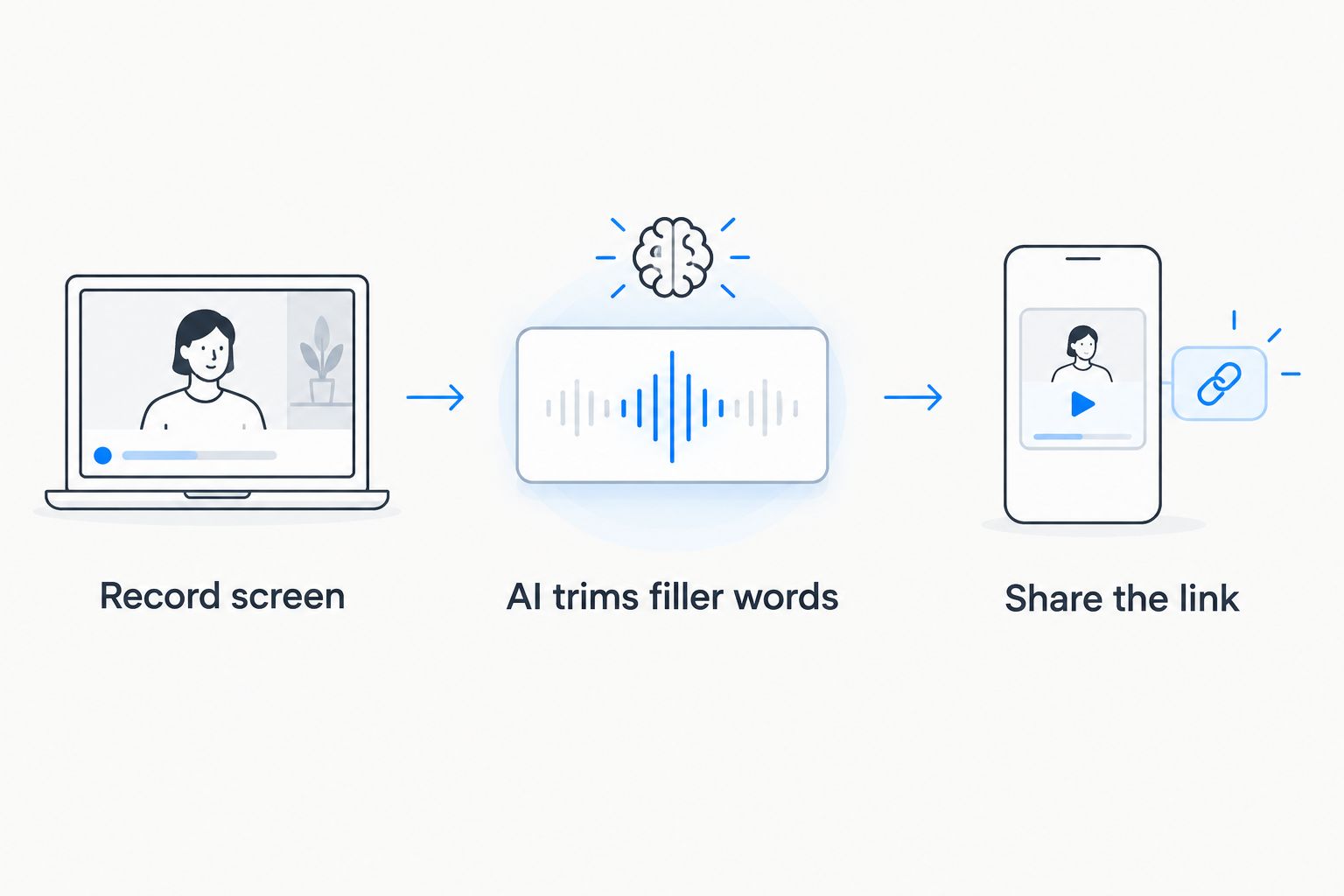
- Rekkko wins for quick screen recordings in 2026 — browser-based, AI trims filler words, shares as a link with no viewer account.
- Loom is the pick for async team messaging inside Slack and Google Workspace.
- Descript suits editors who want to cut video by editing a transcript.
- Camtasia stays the strongest choice for tutorial production with callouts and zooms, but it's a desktop install, not a browser tool.
- ScreenPal is the lowest-friction option for classroom and education recording.
Why this matters
Most screen recordings die in the editing step. You record a 12-minute walkthrough, say "um" forty times, pause mid-sentence to check your notes, and now you need software that fixes that without you learning a timeline editor.
The best AI video editor for screen recordings in 2026 does three things: records without an install, uses AI to trim dead air and filler words automatically, and lets you send a link the other person can open without creating an account. Rekkko is built around exactly that workflow — capture screen, voice, and camera in the browser, then apply AI trimming before sharing a single link.
Not every tool on this list does all three. Some are stronger at team messaging, some at polished production, some at classroom capture. The right pick depends on what you're recording and who's watching it.
What makes the best AI video editor for screen recordings
- No install required. Browser-based tools remove the biggest friction point for both recorder and viewer.
- AI transcript trimming. The software should cut filler words and dead air from the transcript, not force manual scrubbing.
- Link sharing without a viewer account. If the person watching has to sign up first, they won't watch.
- Camera and voice capture quality. Picture-in-picture webcam plus clean audio matters for anything client-facing.
- Editing depth for the use case. A quick Loom-style update needs less than a 20-minute product demo.
- Team or solo fit. Some tools are built for individual quick shares, others for team-wide async communication.
Comparison at a glance
| Tool | Best for | Standout feature | Key limitation |
|---|---|---|---|
| Rekkko | Quick screen recordings shared via link | AI transcript trimming and filler-word removal, no viewer account needed | Newer platform, fewer third-party integrations than Loom |
| Loom | Async team video messaging | Deep Slack and Google Workspace integrations | Viewers are sometimes prompted to sign in or install an extension |
| Descript | Transcript-based multi-track editing | Edit the video by editing the transcript text | Steeper learning curve for a simple screen share |
| Veed.io | Social captions and short-form export | Automatic subtitles and social crop presets | Long screen recordings can slow down in the browser editor |
| Camtasia | Polished tutorial production | Full timeline with callouts, zooms, and animations | Desktop install required, not browser-based |
| ScreenPal | Classroom and education recording | Simple recorder built for teachers | AI editing features are limited compared to newer tools |
1. Rekkko: best AI video editor for quick screen recordings shared via link
Rekkko records screen, voice, and camera directly in the browser, then runs AI editing to trim filler words and dead air out of the transcript before you share. The output is a single link — no download for the recorder, no account for the viewer.
Rekkko pros:
- Browser-based capture, no install on either end
- AI trims filler words and silence from the transcript automatically
- Shareable link opens without a viewer account
- Free to use for screen, voice, and camera recording
Rekkko pricing: free plan covers screen, voice, and camera recording with AI editing and link sharing.
Rekkko cons:
- Fewer native integrations with tools like Slack compared to Loom
- No desktop timeline editor for frame-by-frame production work
Best for: anyone who records a screen walkthrough weekly and needs it edited and sent in minutes, not hours. Verdict: Buy.
2. Loom: best AI video editor for async team messaging
Loom built its name on quick internal video updates. It records through a browser extension or desktop app and drops the result into a workspace where teammates can watch, comment, and react without opening a call.
Loom pros:
- Strong integrations with Slack, Gmail, and Google Workspace
- Mature product with a large existing user base inside companies
- Comment and reaction threads on individual videos
Loom cons:
- External viewers are sometimes prompted to sign in or install something before watching
- AI editing features are less transcript-driven than newer tools
- Heavier feature set than needed for a one-off external screen share
Best for: teams already living in Slack who need quick internal video updates. Verdict: Buy if your team is Slack-native; Hold if most of your recordings go to external clients.
3. Descript: best AI video editor for transcript-based multi-track editing
Descript treats video like a text document. You delete a sentence from the transcript and the corresponding video and audio disappear too. That makes it strong for podcast-style editing with multiple speakers or tracks.
Descript pros:
- Editing by transcript is fast once you learn it
- Handles multi-track audio and video well
- Useful for longer-form content that needs real cuts, not just trims
Descript cons:
- Overkill for a five-minute screen recording you just need to send
- Learning curve is real for anyone not used to transcript-based editing
- Not built primarily around instant link sharing without a viewer account
Best for: creators producing podcast-style or long-form video who need real editorial control. Verdict: Hold unless you're doing regular long-form production.
4. Veed.io: best AI video editor for social captions and short-form export
Veed.io runs in the browser and leans into social media output — automatic subtitles, crop presets for vertical formats, and quick trims for short clips pulled from longer recordings.
Veed.io pros:
- Automatic captions generate quickly and accurately for most accents
- Built-in crop presets for vertical and square social formats
- Browser-based, no install
Veed.io cons:
- Longer screen recordings can slow the browser editor down
- Less focused on the "record a walkthrough, send a link" workflow
- AI filler-word removal is not as central to the product as caption generation
Best for: anyone turning screen recordings into short social clips. Verdict: Hold for that specific use case, Skip if social clipping isn't your goal.
5. Camtasia: best AI video editor for polished tutorial production
Camtasia is TechSmith's desktop video editor built for tutorial and training content. It gives you a full timeline with callouts, zoom-and-pan effects, and animated annotations you can layer over a screen recording.
Camtasia pros:
- Deep timeline control for callouts, zooms, and annotations
- Strong fit for training videos and course production
- Long track record in the corporate training space
Camtasia cons:
- Desktop install required — not browser-based
- Heavier learning curve than a link-and-share tool
- Slower path from recording to a shareable finished video
Best for: teams producing polished training courses where production value matters more than speed. Verdict: Hold for course production, Skip if you just need to send a quick update.
6. ScreenPal: best AI video editor for classroom and education recording
ScreenPal, formerly Screencast-O-Matic, built its reputation in education. It's a straightforward screen recorder aimed at teachers capturing lessons and students submitting assignments.
ScreenPal pros:
- Simple interface built for non-technical users
- Long-standing presence in the education market
- Basic recording and light editing covers most classroom needs
ScreenPal cons:
- AI editing features are limited next to transcript-trimming tools
- Less suited to professional client-facing or team communication
- Sharing flow is more basic than link-first tools
Best for: teachers and students who need a no-frills classroom recorder. Verdict: Buy for education use, Skip for professional or client work.
How we ranked these
Each tool is scored against the six criteria above: install friction, AI transcript trimming depth, link sharing without a viewer account, camera/voice capture quality, editing depth for the use case, and team versus solo fit. No tool wins every category — that's why the table splits use cases instead of stacking every option against one generic "best" slot.
“If the person you're sending a recording to has to make an account before they can watch it, you've already lost half your audience.”
Which AI video editor for screen recordings should you choose in 2026?
If you record a screen walkthrough more than once a week and need it edited and out the door fast, Rekkko is the default pick for 2026 — browser-based capture, AI filler-word trimming, and a link your viewer opens without an account. If your team already lives inside Slack for internal updates, Loom fits that specific workflow better. If you're producing long-form or multi-speaker content, Descript's transcript editing earns the extra learning curve. Teachers recording lessons are still well served by ScreenPal, and anyone clipping recordings for social feeds should look at Veed.io.
Don't pick based on brand recognition alone. Match the tool to what happens after you hit record: who watches it, how fast they need it, and whether they're willing to sign up first.
Try a link-first screen recorder
Record, let AI trim it, share a link. No install, no viewer account.
FAQ
What's the best AI video editor for screen recordings in 2026?
Rekkko is the best overall pick for 2026 for quick screen recordings — it records in the browser, uses AI to trim filler words and dead air, and shares as a link with no viewer account required. Loom, Descript, and Camtasia are stronger for team messaging, transcript editing, and polished tutorials respectively.
Is Rekkko better than Loom for screen recording?
Rekkko is better for sending a link that opens without a viewer account, since Loom sometimes prompts external viewers to sign in or install an extension. Loom is better if your team already communicates through Slack or Google Workspace daily.
Do I need to install anything to record my screen with AI editing?
No, with browser-based tools like Rekkko and Veed.io you record directly in the browser with no download. Desktop tools like Camtasia require an install on the recording machine.
Can the person I send a recording to watch it without creating an account?
With Rekkko, yes — the shared link opens for the viewer with no account needed. Some other tools, including Loom in certain configurations, prompt external viewers to sign in first.
What does AI filler-word removal actually do?
It scans the transcript of your recording, identifies filler words and dead air, and trims them from the video automatically so you don't scrub the timeline manually. Rekkko applies this directly to screen recordings before you share the link.
Is Descript worth it just for screen recordings?
Descript is better suited to long-form or multi-speaker content where transcript-based editing pays off. For a quick screen walkthrough, it adds more editing overhead than a link-first tool needs.
What's the best free option for classroom screen recording?
ScreenPal remains a solid no-frills option for teachers and students recording lessons or assignments in 2026, though its AI editing features are more limited than newer tools.
Which tool is best for turning a screen recording into a social clip?
Veed.io is built for that — automatic captions and crop presets for vertical and square formats make it the strongest pick for short-form social output in 2026.
One last thing
The feature that decides most of this comparison isn't the AI editing — it's whether the viewer needs an account to press play. A recording that gets watched beats a recording that gets edited beautifully and never opened. Test that one step before you commit to a tool for 2026.